Personal Finance

Your finances,
finally in order

Track every expense, plan budgets, reach your goals — without connecting to a bank. All data stays on your device.
App Store Free · In-App Purchases
ChibyooFlow
📊 Expense tracking 💰 Budgets & goals 🔁 Scheduled payments ☁️ iCloud sync 🌍 Multi-currency 📥 CSV & PDF import
01

All accounts in one place

Add any type of account: cash, debit card, credit card, savings, loan or mortgage. See balances, track credit limits, monitor loan schedules and savings progress — all from one screen.

  • Cash, debit, credit card, savings, loan, mortgage
  • Credit card grace period & minimum payment tracker
  • Loan amortization schedule with early repayment
  • Multiple layouts: carousel, grid, single card, wallet
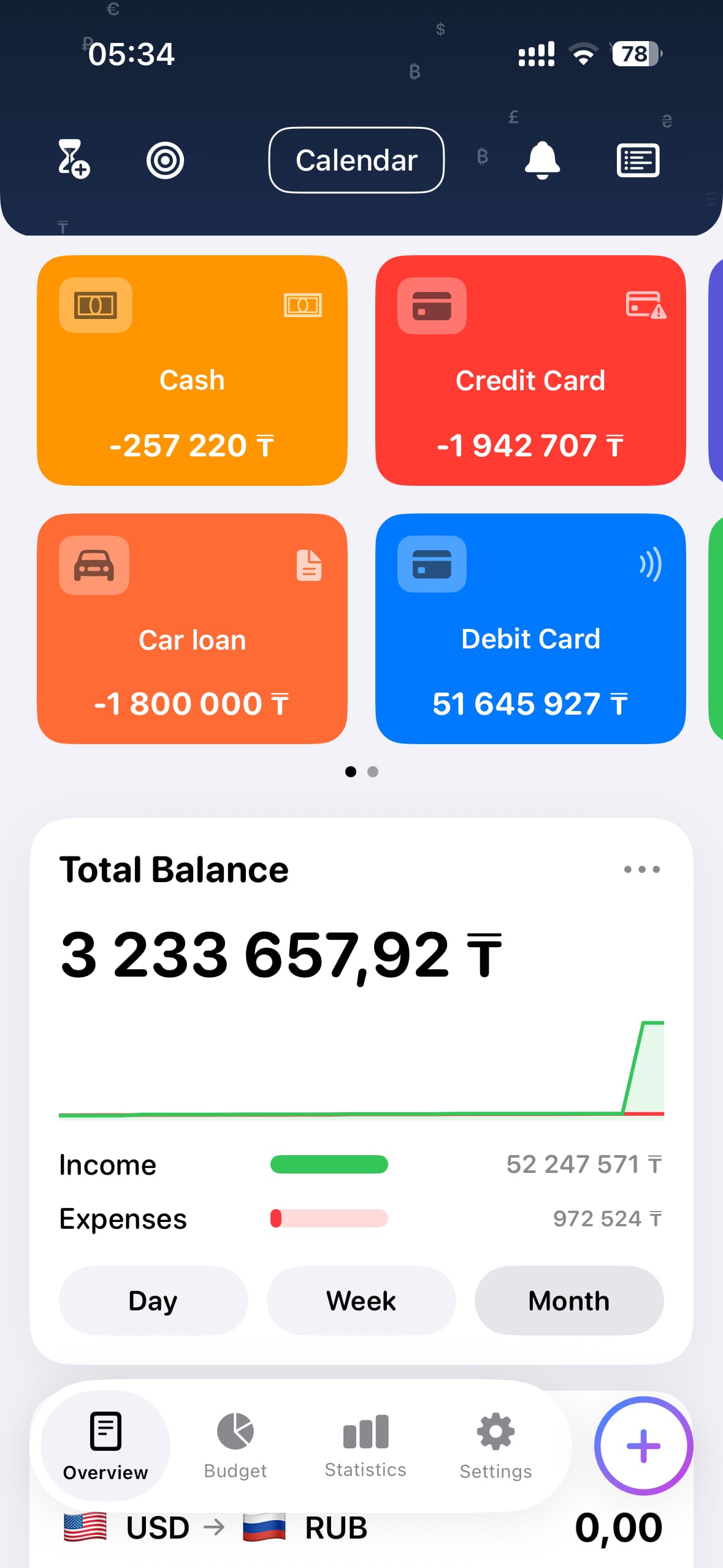
Accounts overview
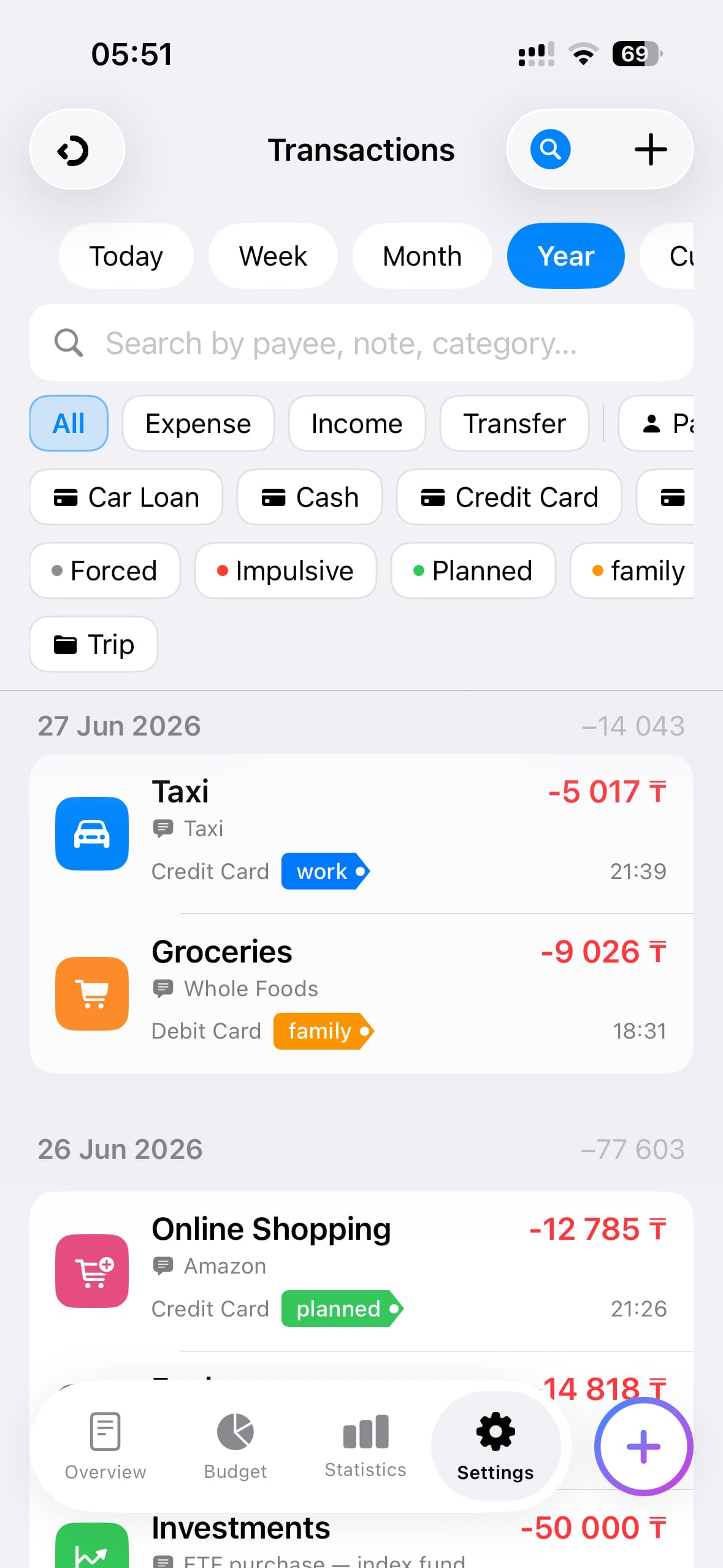
Transactions
02

Every expense. Tagged and tracked.

Log income, expenses and transfers in seconds. Filter by type, account, category or custom tag. Attach a photo of the receipt, add a note or pin the location — all in one place.

  • Filter by period, type, account, category, tag
  • Tags for spending context: planned, impulsive, work, family
  • Receipt photos, notes, payee, geolocation
  • SMS import from bank notifications
03

Set budgets. Stay on track.

Create monthly budgets for any category and watch your spending in real time. Get warnings before you hit the limit, and see how much is left for each budget period.

  • Monthly budgets by spending category
  • Real-time progress with days remaining
  • Alerts when approaching limit
  • Credit card reserve & income vs. plans summary
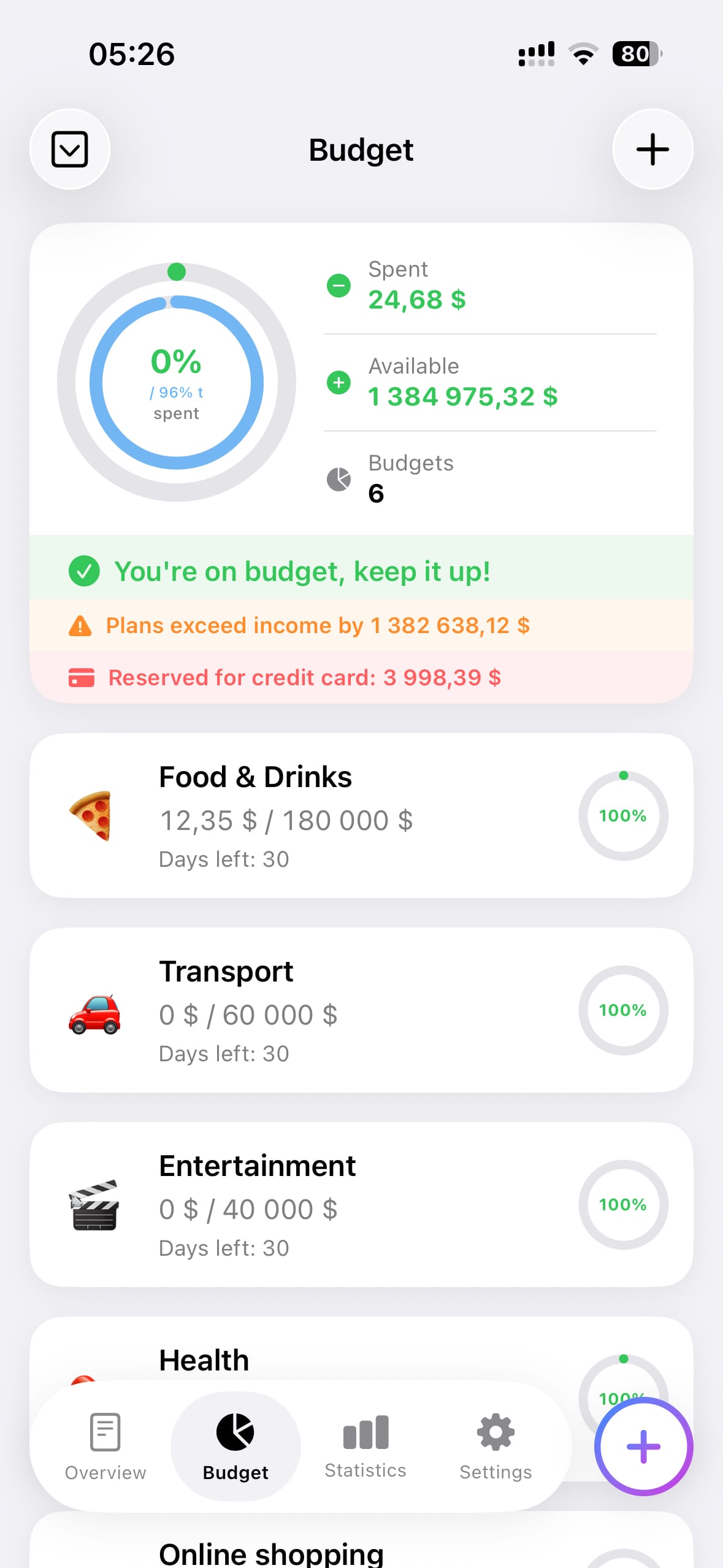
Budgets
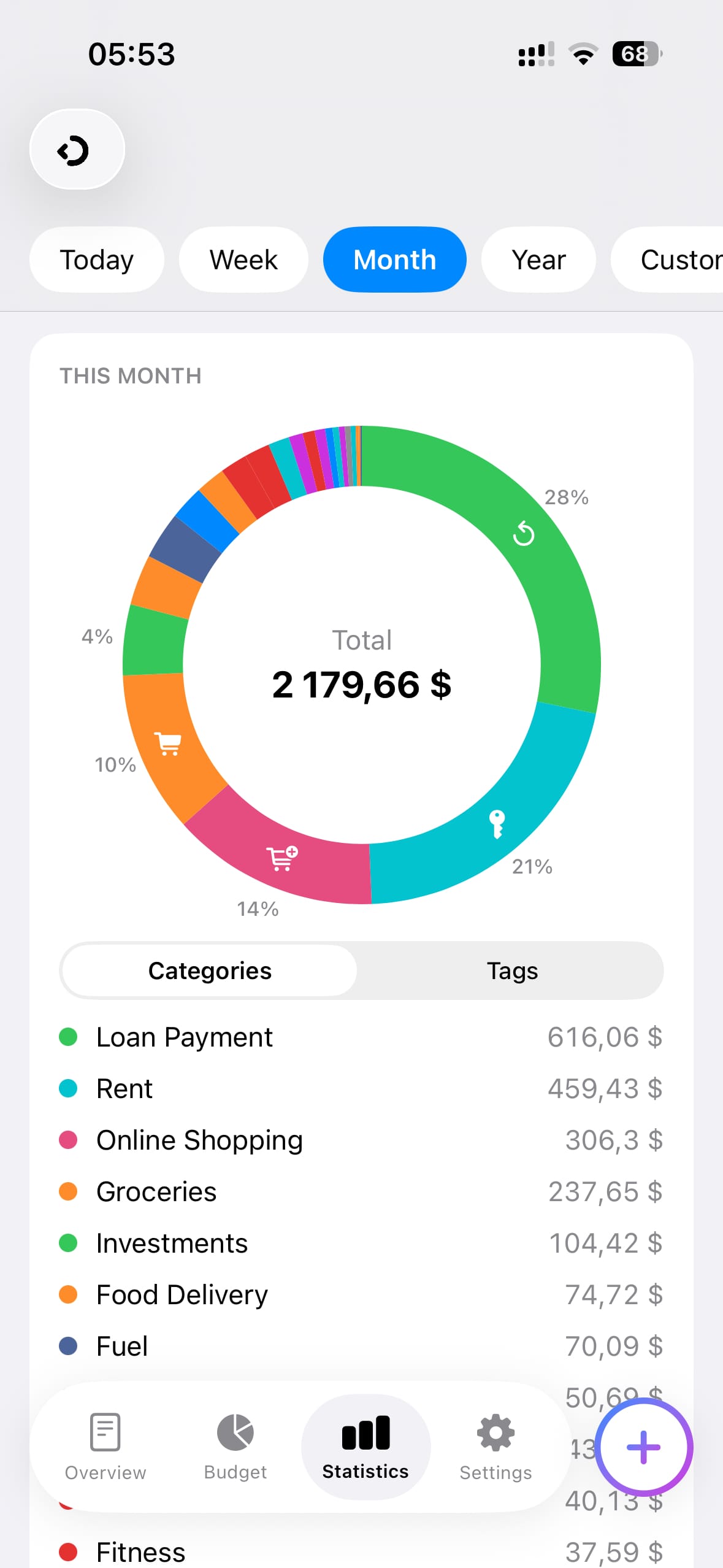
Statistics
04

See where your money really goes

Visual breakdown of your spending by category or tag. Switch between today, week, month, year or any custom range. Compare income vs expenses and understand your spending patterns.

  • Donut chart by category or tag
  • Today / Week / Month / Year / Custom range
  • Income vs expenses comparison
  • Balance trend, forecast, savings & loans tiles
05

Never miss a bill or subscription

Track all recurring payments in one place — subscriptions, rent, loan payments, utilities. See the total monthly cost of your subscriptions and get reminders before payment dates.

  • Separate lists for subscriptions and recurring payments
  • Monthly & yearly total for subscriptions
  • Reminders 1, 2 or 3 days before due date
  • Overdue payments highlighted automatically
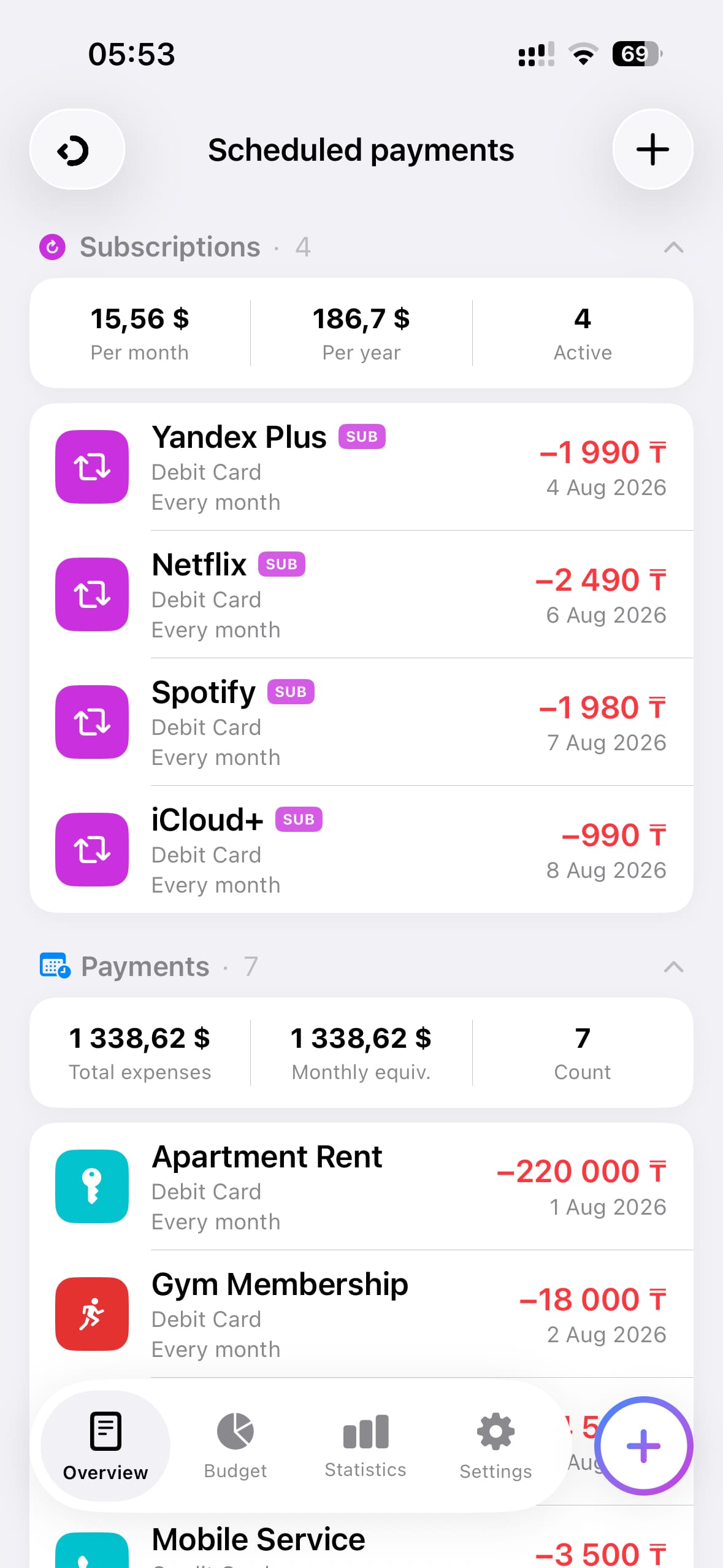
Scheduled payments
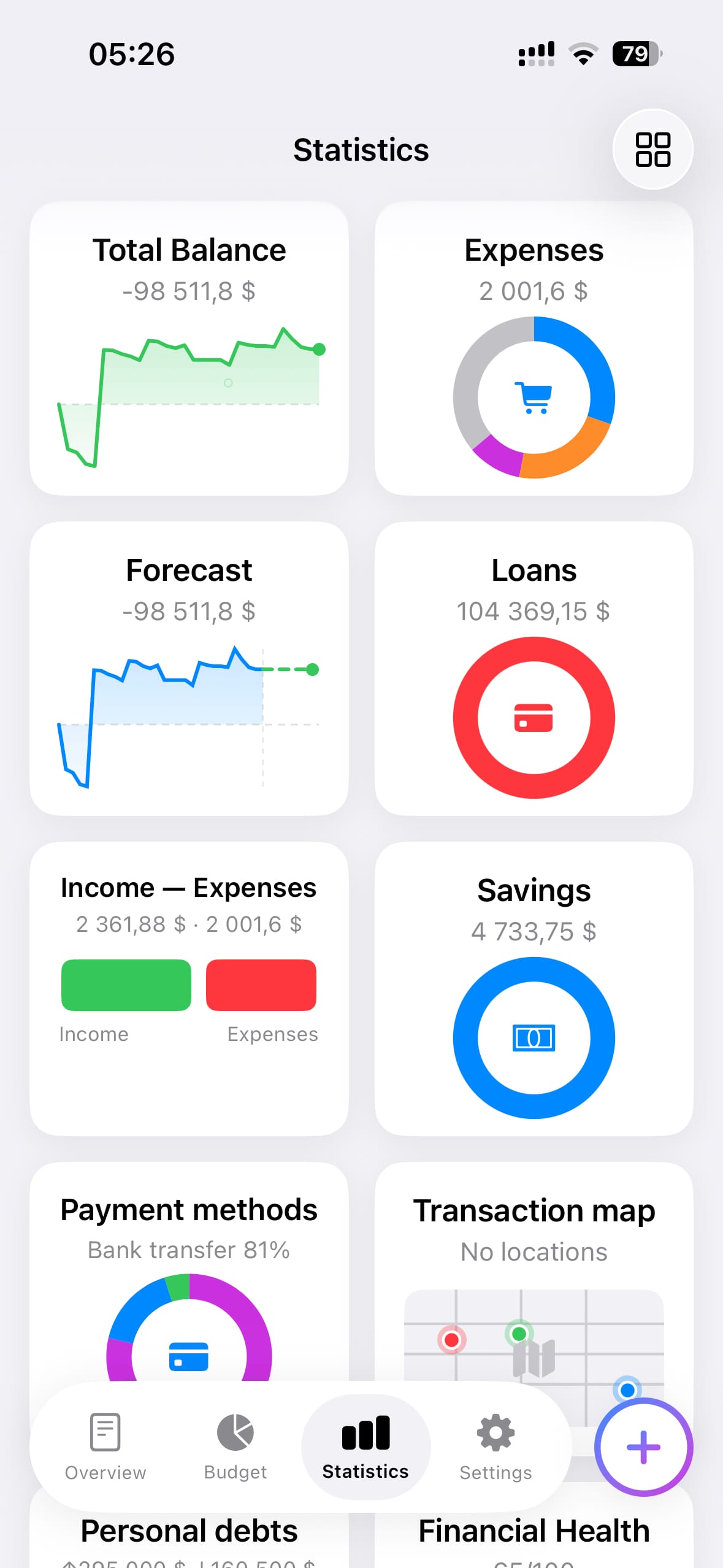
Analytics dashboard
06

Deep insights into your finances

A full dashboard of financial tiles — balance history, expense breakdown, forecast, savings, loans, payment methods. Everything you need to understand your financial picture at a glance.

  • Balance history chart & balance forecast
  • Savings and loan progress
  • Payment method breakdown
  • Financial health score & cash flow
🔒

Your data stays yours

No bank connections. No account required. All financial data is stored locally on your device and synced privately via your iCloud — only you can access it. We never see your numbers.

✓ No registration ✓ No bank access ✓ iCloud encrypted sync ✓ Data deletion anytime

Frequently asked questions

No. ChibyooFlow works without any bank connection. You add accounts and transactions manually. This is intentional — your banking credentials are never shared with anyone.
The app can read bank SMS notifications on your device and automatically parse transaction details — amount, merchant, account. All processing happens locally on your iPhone. No SMS data is ever sent to any server. You review the parsed transactions before they are saved.
When you import transactions from a bank statement (CSV or PDF), transfers between your own accounts often appear as two separate entries — one debit and one credit. Transfer matching automatically detects these pairs and links them into a single transfer transaction, so your balance stays accurate and the expense is not counted twice.
Yes. ChibyooFlow supports CSV and PDF import from several banks. Go to Settings → Accounts → Import file, select your file, review the parsed transactions, and save. The app handles duplicates and transfer matching automatically during import.
All data is stored locally on your iPhone using SwiftData. If you enable iCloud sync, data is synced across your devices via your private iCloud database — encrypted by Apple, accessible only to you. We have no access to your data at any point.
Deleting the app removes all local data from your device automatically. If iCloud sync was enabled, your data remains in iCloud until you manually delete it: go to iOS Settings → [your name] → iCloud → Manage Storage → ChibyooFlow → Delete Data.
Enable iCloud sync in Settings → Sync. Your data will automatically sync across all your Apple devices signed into the same iCloud account. No account registration is required — it uses your existing Apple ID.
ChibyooFlow is currently iOS only. There are no plans for an Android or web version at this time.
Go to Settings → Currency. Add any currency and set your base currency. Exchange rates can be updated manually or automatically. All amounts in the app are displayed in your base currency, with original amounts available on each transaction.
Email us at support@chibyoo.comwe respond within 1–2 business days.
ChibyooFlow

Start tracking today

Free to download. No sign-up required.

Download on App Store